User Settings and Sharing Your Stream With Broadcasters and Fans
Last Updated: April 19
Sharing Your Stream With Broadcasters and Fans
Here are a couple of ways to share your stream with broadcasters and fans:
Share the direct YouTube Stream Link (send it to your friends, share it on your social media, etc.)
- Set Up Your User Profile to Share With Broadcasters:
In your User Profile, find the “Broadcaster List” section
Toggle the “Share With?” to Yes next to the broadcaster(s) you want to share your stream with.
Click on “Save Changes” to save your settings.
Tag MyRaces.Live on social media and share your stream links to get featured on our channels!
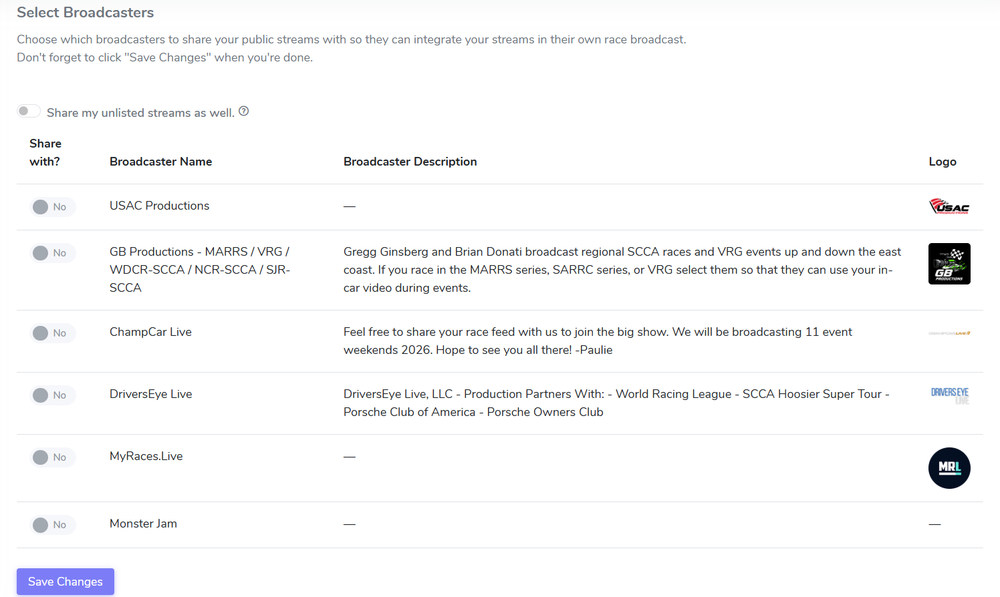
Broadcaster List in User Profile
Note
If you don’t see your broadcaster name in the list, feel free to share their contact information with us so we can contact them about being added to the list.
Change Your Password
To change your password:
Go to Account > User Profile in the portal.
Find the Change My Password section.
Enter your current password and the new password.
Click Change Password to update your password.
Update Your Avatar
To update your avatar:
Go to Account > User Profile in the portal.
Find the Update My Avatar section.
Click on Choose File.
Select a new avatar picture from your device.
Click Update Avatar to update your avatar.
Refresh the page to see your new avatar.